
Our Story
An art gallery recommended over dinner. A beach you want to visit next summer. The restaurant you would happily drive across town for again.
Places arrive in our lives as recommendations, links, photographs, and half-remembered names. Remembering them is one challenge, and making them useful when you are deciding where to go is another.
We started building Cityscribe in the summer of 2023 and released the first version of the app in January 2024. Our original idea was to create a way to save and recommend our favorite restaurants. As we travelled more, we realized that the same idea could apply to any place that meant something to us. Six months after launch, we expanded from restaurants to almost anywhere.
The places we remember often become the places we recommend, and someone else’s recommendations can shape where we go next. We wanted to make it easier to hold on to the memories you’ve made, share the places behind them, and find inspiration for your next trip. Bringing that idea to life meant solving challenges across iOS and AWS, and this is an in-depth look at the decisions, tradeoffs, and engineering that brought it all together.
Goals
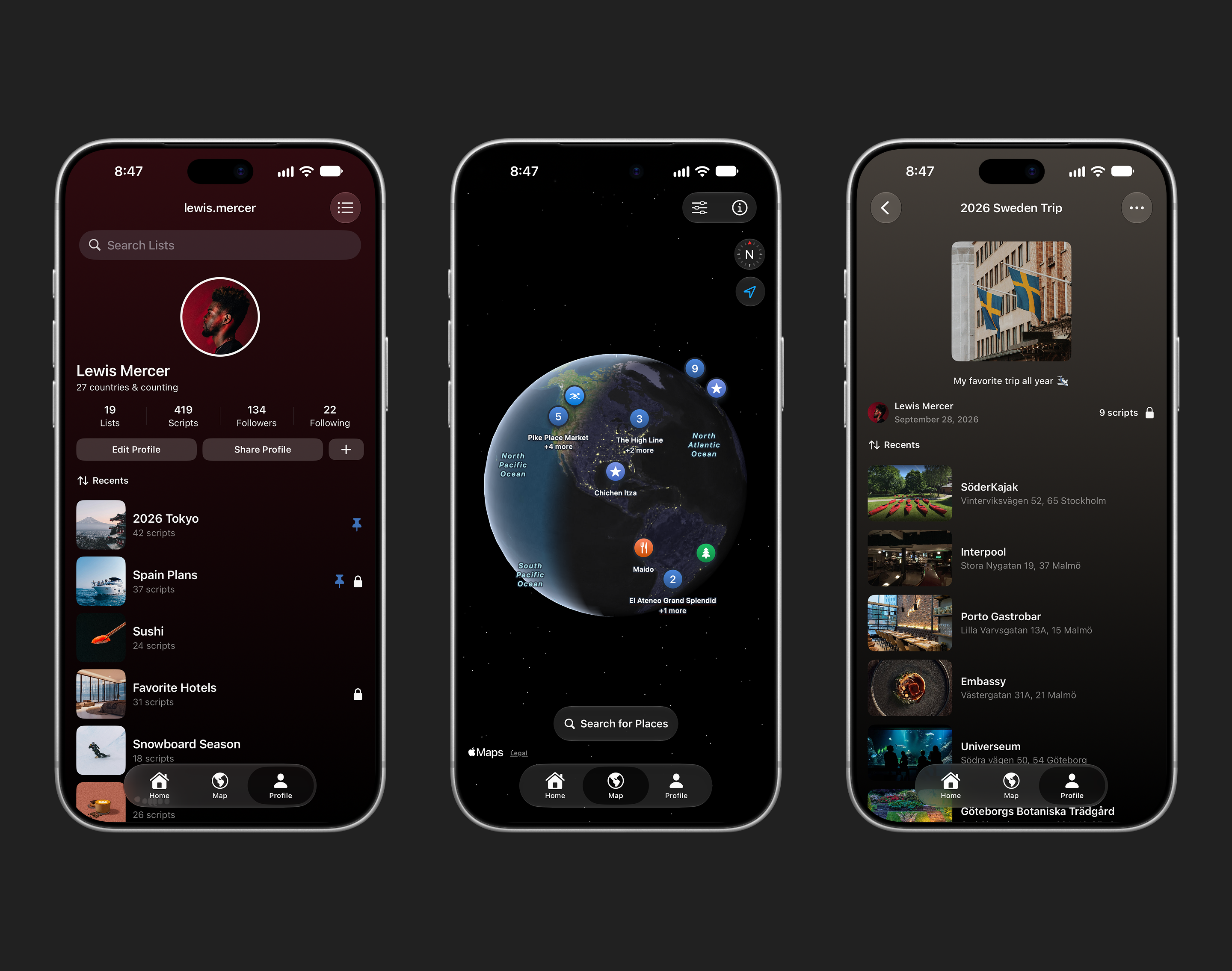
From the start, we wanted the app to feel uncluttered and easy to understand. Every button and every view should earn its place. Keeping the UI simple meant making deliberate choices about what belongs on screen and when it becomes useful. For a map view on any iPhone, that becomes important. It allows the user to view more of their saved places, or places they're searching for, without having to constantly pan around the map.
Privacy and security also needed to be critical pieces to our foundation. With AI accounting for a good portion of code nowadays, it's easy to let a lot of those concerns become an afterthought. Creating strict guidelines and ensuring they get reviewed before and during every pull request becomes extremely important. Convenience and development speed must never become reasons to weaken those protections.
We wanted that clarity to also extend into how we write our code. Across both iOS and AWS, our goal was to give each component a focused responsibility and a clear way to work with the rest of the system. That keeps each component clean, easy to refine, and easy to track its privacy and security implementations.
Architecture
We use a range of technologies across our tech stack, but we try to keep as much as possible within AWS or native iOS frameworks. In some cases, though, trusted open-source libraries make more sense for now. Kingfisher is a great example as it’s lightweight and handles image caching for us, so we can spend more time building features and fixing bugs.
Listed below are the core technologies we use for both iOS and AWS.
| Part of the system | Technologies |
|---|---|
| iOS | Swift, SwiftUI, UIKit, Metal |
| Authentication | Cognito |
| Service Connections | API Gateway, Lambda |
| Database | RDS for PostgreSQL, RDS proxy |
| Place Providers | Apple Maps, Tripadvisor, Foursquare |
| Image Storage | S3 and CloudFront |
| Backend Credentials | Secrets Manager |
| Background Processing | SQS |
| iOS Image Cache | Kingfisher |
| Welcome Card Imagery | Unsplash |
| Notifications | Apple Push Notifications (APN) |
| Diagnostics | Sentry |
| Analytics | Amplitude |
| Release Scripts | XCUITest, XCTest, screenshot renderer, and Fastlane |
AWS
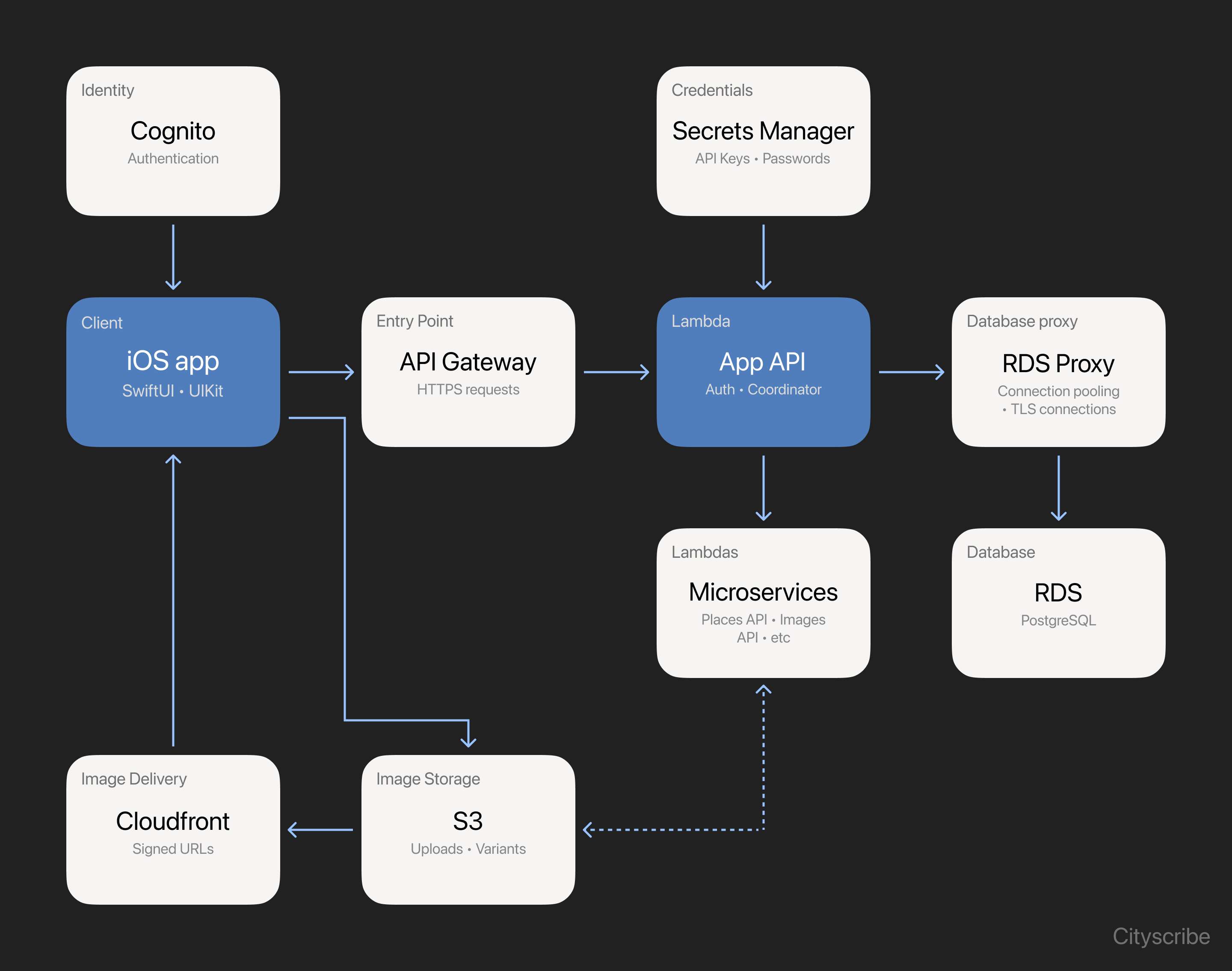
Our AWS architecture is built around focused services with distinct responsibilities. Cognito handles authentication, while API Gateway routes requests to our APIs running on Lambda. Those APIs handle application logic, verify identity and permissions for protected requests, and coordinate the services needed to fulfill each request.
Database connectivity stays behind the application boundary. The API uses a SQLx connection pool and connects through RDS Proxy to PostgreSQL on Amazon RDS. SQLx reuses connections within a running application instance, while RDS Proxy manages database connections across clients. That matters when Lambda concurrency grows and more execution environments need connections.
User-uploaded images have their own storage and delivery path through S3 and CloudFront. SQS connects application events to background Lambda workers, allowing image processing to continue after the initiating request has finished. A worker validates and decodes the uploaded photo, normalizes its orientation, and creates display variants.
For the configured CloudFront path, the API checks access and returns a time-limited signed URL. CloudFront delivers the generated variant, with S3 supplying the image. This keeps image bytes on a dedicated delivery path while the application API remains responsible for access decisions.
iOS
We wrote Cityscribe in Swift, using both SwiftUI and UIKit. Building natively gives us the advantage of using Apple's frameworks directly, along with finer control over things like performance and accessibility. Keeping the app in Swift also means fewer layers to work through when diagnosing bugs and performance issues.
Although SwiftUI works well, UIKit still excels in certain areas, and our map view is a great example of that. We chose UIKit for the map for two reasons: annotation clustering and performance. Grouping nearby pins keeps a busy map readable and reduces the number of separate markers on screen. As someone zooms in, clusters give way to individual places. Performance was equally important, as we wanted panning, zooming, and annotation updates to remain smooth and responsive.
We use Model–View–ViewModel (MVVM) to give the interface and the logic behind it clear responsibilities. Views display content and pass interactions to view models, which manage screen state and coordinate the work those interactions require. Models represent the data used by both. In Xcode, related views and view models are grouped by feature, with shared types and services kept in dedicated areas.
Beneath the view models, the service layer exposes operations that reflect what the app needs to do, such as fetching place details. Services coordinate those operations and supply any required authentication, giving screens a consistent interface to work with.
Endpoint enums define the routes and query parameters available to each service. The service selects an endpoint and passes the request details to our networking layer, which sends the request through URLSession, validates the response, and decodes it into Swift models. Shared response and error handling gives services consistent behavior, while each view model decides how the result affects its screen.
We keep each layer focused on its own job and limit what it needs to know about the rest of the app. We use generics throughout our layers to make that behavior reusable across different types. Our networking layer, for example, can decode different Decodable response models through the same implementation, without knowing which screen requested them or how they will be displayed.
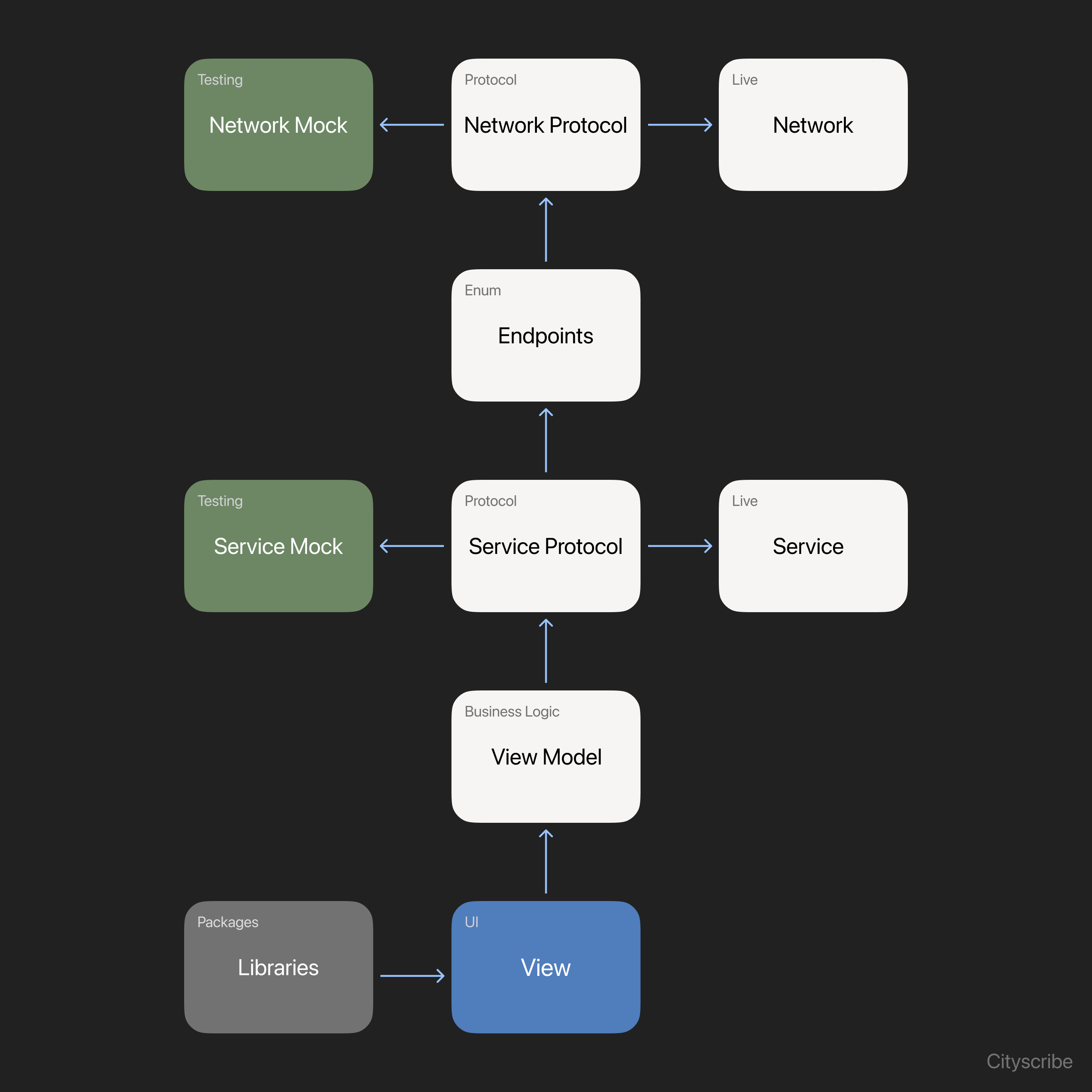
Protocols give us a practical way to test these boundaries. View models receive their service dependencies through their initializers, allowing us to supply a live implementation or a mock with predictable responses and errors. The same approach supports SwiftUI previews and repeatable screenshot capture. Injecting networking dependencies lets us exercise request behavior separately from the screens that use it.
Xcode schemes and build configurations distinguish Development, Staging, and Production, with shared settings collected in a common .xcconfig file. Launch arguments separately enable mock content for automated screenshot workflows. Together, these choices let us work on the same screens across everyday development, repeatable test scenarios, and release builds.
Microservices
Our application API coordinates focused Lambda services, each responsible for a particular kind of work. Some handle provider requests, while others prepare user-uploaded images for display in the background.
Places API
The Apple Maps Server API provides the foundation for our place experience, including search and basic information such as names, addresses, and coordinates. Foursquare and Tripadvisor help fill out that picture with photos, ratings, opening hours, and other details when available.
The Places API also handles refreshing the information shown in the app. It requests updated details from Apple Maps and checks the other providers for additional information when needed. Each integration handles its own request formats, response structures, and failures, so an unavailable extra does not need to become a failed place view.
Keeping provider-specific work behind a common interface makes it easier to add or remove an integration without spreading those changes across the app. Foursquare and Tripadvisor remain optional, and the core search and place-detail experience can operate with the Apple Maps Server API alone.
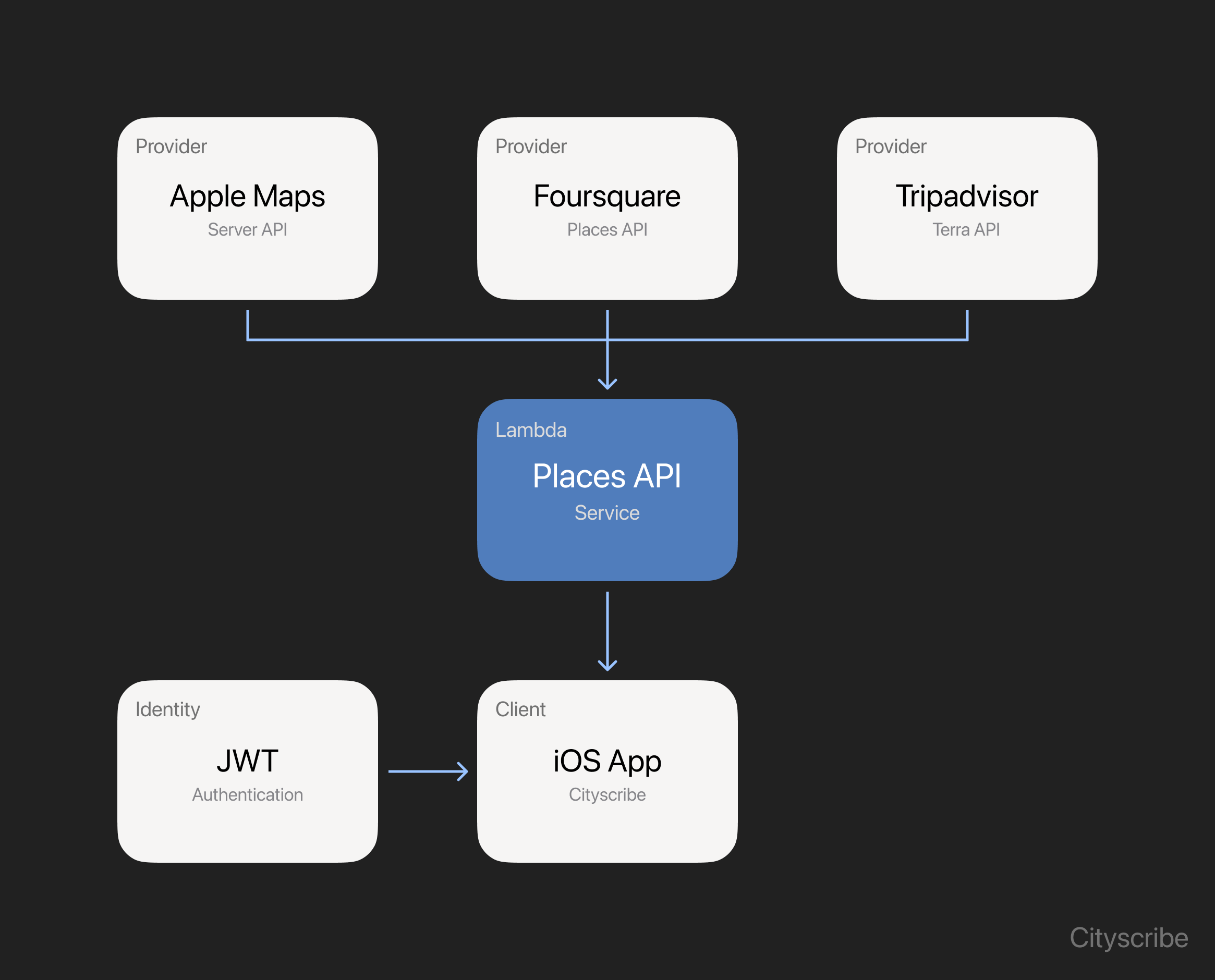
Image APIs
The image services handle uploads, prepare display variants, and provide delivery URLs for images a viewer is allowed to access. The iOS image layer handles loading those images into the interface.
Keeping those responsibilities separate is useful because a photo from a library can be much larger than the version needed in a list row. A background worker prepares the image for display, while a SwiftUI view represents its loading, ready, and failure states.
Other
Other services have smaller, specific roles. Our authentication Lambdas support sign-up and sign-in alongside Cognito, handling account setup and validation around those workflows. Unsplash supplies city imagery for the home welcome card. Our push notification service uses Apple Push Notification service (APNs) for delivery, while handling notification preferences and removing device tokens that Apple identifies as invalid.
Security
For protected application requests, the backend verifies a Cognito token's signature, issuer, and expiration to establish the caller's identity. Reading or changing a particular list or photo then requires application-level checks against that person's permissions.
Backend provider credentials are retrieved through AWS Secrets Manager. Integrations obtain their secret material on the server, keeping that responsibility out of the iOS interface.
The user-uploaded image pipeline protects privacy by re-encoding display variants without copying the source's EXIF or GPS metadata. For protected user-uploaded photos, delivery also requires access checks and time-limited URLs.
Telemetry has its own boundaries. Amplitude receives structured product events through a central analytics layer. Event properties exclude free-form notes, search text, and GPS coordinates, and people can disable product analytics in settings. The implementation can associate events with an opaque account identifier and use IP-derived coarse geography.
Sentry handles diagnostic failures separately. The app builds bounded error reports and scrubs events before sending them. Diagnostics can still be associated with an opaque signed-in account identifier.
These choices put privacy into practice through the permissions on a request, the information an uploaded photo reveals, and the contents of a diagnostic event.
Responsiveness
From the person's perspective, all of this work belongs to one app. The interface needs to stay coherent while requests overlap, images arrive late, or someone changes their mind halfway through an interaction.
Search is a useful example. Someone can type a query, replace it, and move the map before an earlier response returns. Cityscribe cancels superseded autocomplete work and checks that a response still belongs to the current query before applying it. The latest intent determines what should appear on screen.
The networking layer also coordinates token retrieval. When several screens need authenticated data at the same time, the token cache lets callers share an in-progress retrieval. Invalidating that cache is part of keeping session changes consistent.
For images, Kingfisher handles asynchronous loading and processing for the display size. A dedicated image layer keeps that work out of individual views. Placeholder and skeleton states establish the layout while content arrives, and an unavailable image need not prevent someone from reading the rest of a place.
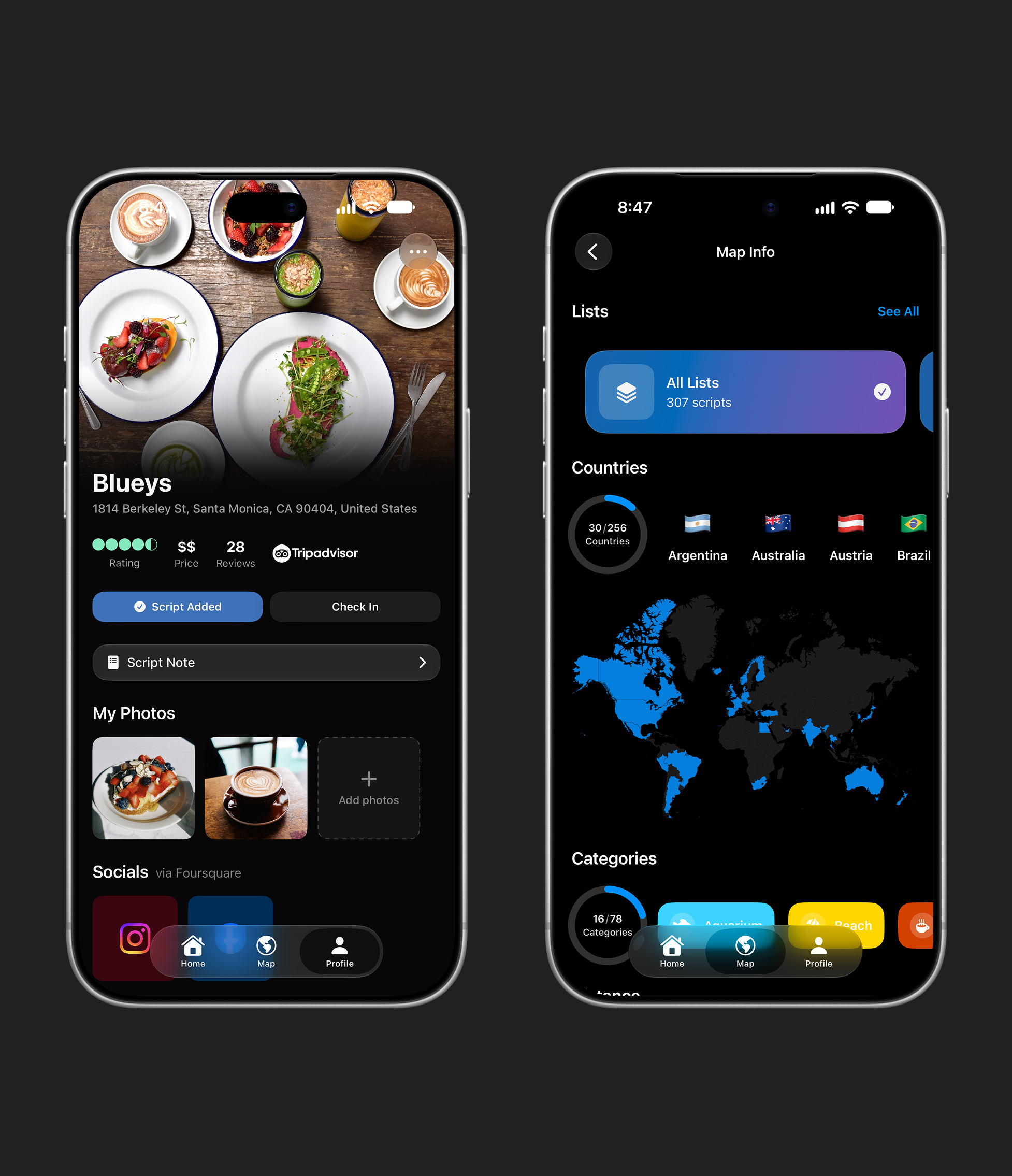
Responsiveness is also about clarity. The interface should make the current state understandable, including when an operation is still running or cannot complete.
Accessibility
That clarity needs to hold across different ways of reading and interacting with an iPhone. In a visual application built around maps and images, the behavior of controls, labels, and supporting screens deserves particular attention.
Cityscribe uses Dynamic Type-aware layouts and scaled dimensions in parts of the interface, including adaptations for larger accessibility text sizes. Supporting larger text means revisiting the arrangement of controls as well as their font size. A row may need more room or a different layout as the text grows.
VoiceOver support appears in labels, hints, values, and actions. An icon needs a meaningful name. A selected filter needs to expose its state. Form validation needs to announce relevant errors, and related content needs grouping that makes sense when it is spoken aloud.
The app also respects Reduce Motion in experiences such as onboarding, animated backgrounds, and selected transitions. Localization places another useful demand on the interface, since longer translations need room just as larger text does. Localized strings live in a .xcstrings file, and the UI test workflow captures screens in multiple languages.
These details make accessibility part of building and refining each screen. They also give the testing and release workflow something concrete to exercise.
How We Release
A release brings together how the app looks and works, along with the screenshots and text that introduce it to someone new. Keeping those pieces aligned is part of the engineering work.
Our tests cover areas such as business logic, networking, and error handling. UI automation exercises localization and captures marketing screens using deterministic sample content. The same service boundaries used by the live app make those repeatable scenarios possible.
A custom renderer we built takes the captured screenshots and combines them with device frames and localized text. Fastlane validates and stages the resulting App Store assets, then uploads screenshots and metadata in a consistent order.
That gives design changes a repeatable path into the store listing. It also keeps the product shown in the screenshots tied to the app itself, while leaving room to review how the experience reads across languages and screen sizes.
What's Next
As Cityscribe grows, we're continuing to improve both the iOS app and the systems we run on AWS.
Continuous testing and measurement help us understand how the app behaves in different situations and where we can improve the experience. We also evaluate AWS services that could simplify our systems and reduce operational overhead, keeping the backend efficient and manageable.
Web and Android apps are also on the horizon. We want to bring the foundations we've built and the lessons we've learned to those clients, so people can enjoy the same Cityscribe experience wherever they choose to use it.
We believe what makes an app special is in the smallest details. We want Cityscribe to be not only something that lasts, but also something you can enjoy and trust. That means listening carefully to the people who use it and letting what matters to them shape what we build next.